Operator · How-to
Add a household member#
Give someone in the house their own account: their own notebooks, their own tablet, their own storage allotment. You need an administrator account.
Open the admin console#
In the library’s left rail, choose Admin. Confirm your password and choose Unlock console: it asks again because the console can delete other people’s notes. It locks itself after 15 minutes without use, or when you choose Lock console.
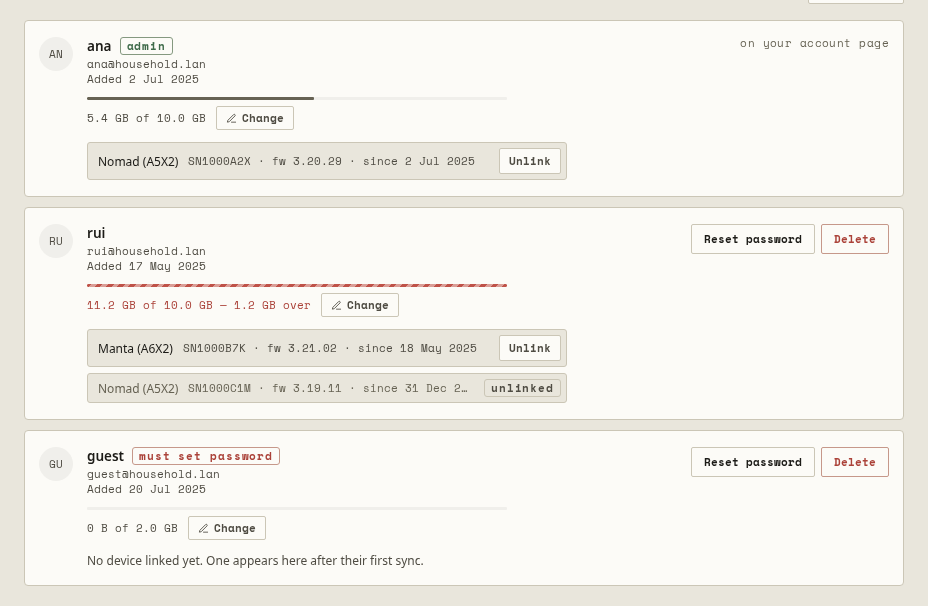
Add someone#
- Choose Add person.
- Enter their Email. Tick Also an administrator only if they should manage the household too.
- Choose Add person. Inkhold shows a temporary password, once.
- Give them the password. They choose their own the first time they sign in, in a browser or on their tablet.
Their tablet appears under their name after its first sync.
When someone forgets their password#
Find them in the console and choose Reset password. Inkhold shows a new temporary password, once, and signs them out everywhere. They choose their own at their next sign-in.
You change your own password on your account page, from You in the library.
Remove someone#
Choose Delete beside them, type their address, and choose Delete permanently. This removes the account and everything in it. It can’t be undone, and the recycle bin doesn’t hold it: back up first if anything of theirs might be wanted later.
If nobody can sign in#
The admin console can’t help when the only administrator is locked out. On the server, the command line can:
inkhold --config=/etc/inkhold/config.zon users list
inkhold --config=/etc/inkhold/config.zon users reset-password ana@home.lan
inkhold --config=/etc/inkhold/config.zon users make-admin rui@home.lan
A household with one administrator is one forgotten password from that situation: making a second administrator now is cheap insurance.